
Paper Edit App
Paper edits,
automated.
Turn transcripts into timelines in a click.
First project free — no credit card required.
Free tier includes export. No time limit.
Upgrade when you need more projects.
How it works
Send from Premiere & Resolve
Start a Paper Edit by reading your source timeline transcript and metadata with the free Paper Edit Bridge panel — no media files to export or upload.
Craft a Paper Edit
Read the transcript. Drag across words to select moments, reorder blocks, label sections, add markers and notes. Search across sources. Shape the edit in minutes.
Build the Timeline
Click Build in the Bridge panel. It pulls your paper edit and constructs the finished timeline directly from your source media — no re-imports, no relinking.
Built for
Documentary editors.
Interview-led projects.
Podcasts. Webinars.
If your edit starts with a transcript and ends in a timeline, this is for you.
No more timecode lists. No more copying and pasting. No more wasted time.
Why it's better
Designed the way editors want to work.
Built on 20 years of editing experience, by Jonny Elwyn — freelance editor and author of Cut Daily.
Workflow
No media uploads — Footage never leaves Premiere & Resolve. The Bridge panel reads your source sequences directly.
No re-linking — The Bridge connects to existing source media for instant edits.
Timelines made for you — No more timecode lists, highlighted Google Docs, or pasted spreadsheets.
Collaboration
Live collaboration, not just sharing — Invite producers or clients via email. Edit the same paper edit at the same time.
Two-way notifications — Email and in-app alerts for new projects, comments and signed off paper edits.
Frame.io comments — Import comment lists and markers to cross-reference transcripts with video exports.
AI
AI semantic search (Pro) — Find moments by meaning, not just keywords. Search across all your sources at once.
AI that informs, not replaces (Pro) — Editorial suggestions surface ideas you might have missed. You make the creative choices.
No "AI Do It For Me" button — Stay in control of your creative choices.
Pricing
Your first project is free — One complete project — up to 5 sources and 3 saved versions. No credit card, no time limit.
Unlimited projects (Pro) — Unlimited projects, sources and versions — billed annually or monthly.
Simple, flexible pricing — Pay annually for the best rate, or monthly if you'd rather. No hidden costs or extra usage.
Features
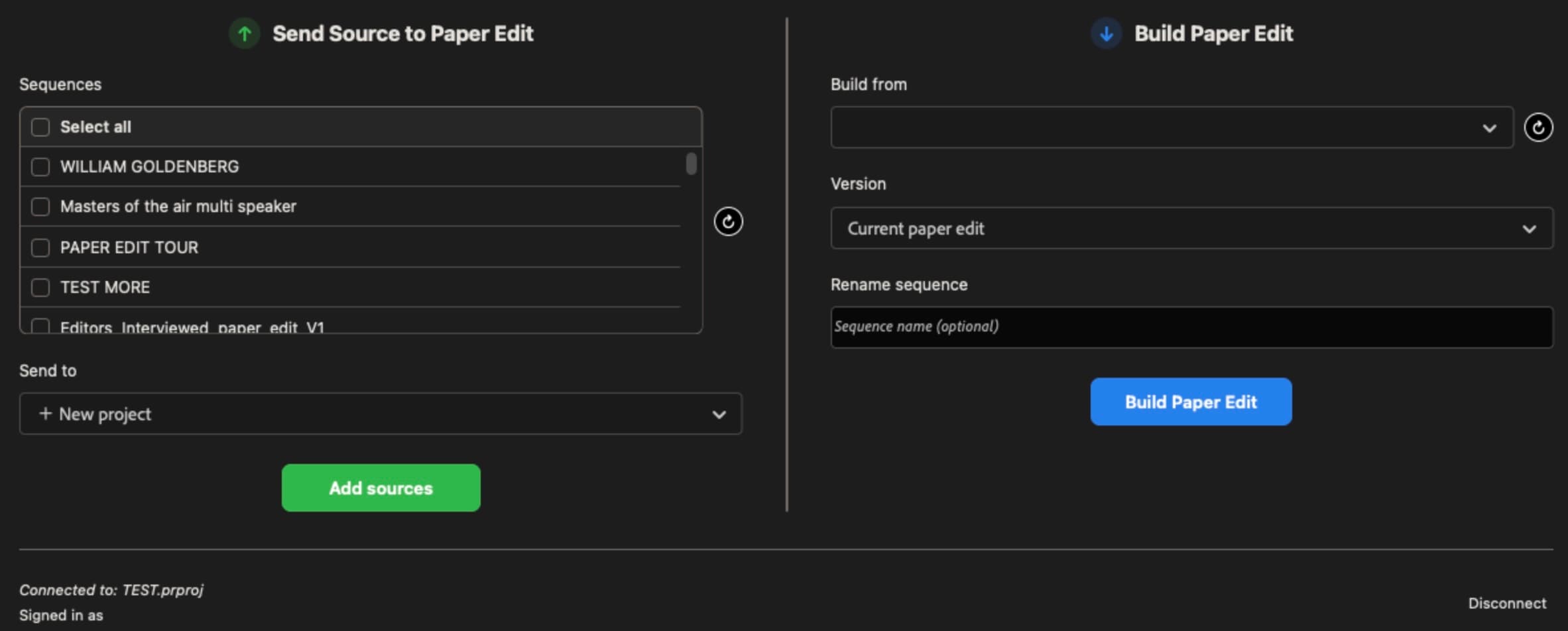
Paper Edit Bridge
A free UXP panel inside Premiere & Resolve. One click sends your sequence and transcript to the browser; one click builds the finished timeline back in your NLE — zero re-imports, zero duplicates.
Live collaboration
Edit the same paper edit together in real time with a producer or client. Changes appear in each other's window within a second — presence avatars show who's in the project.
Keyword & AI semantic search
Search any transcript by word or phrase, or — on Pro — by meaning. Find every moment someone talks about a theme or idea, even if they never say the exact word.
Multi-track & multicam
Handles multi-track audio (stereo, dual-mono, multi-channel) and multicam sequences. All tracks land in the right place — no manual routing.
Frame.io marker import
Import a Frame.io comment export and its markers land right on the matching transcript words — with tooltips and cross-references.
AI features require a pay-as-you-go Claude API key. No extra subscription required.
Pricing
Simple, honest pricing.
Free
$0
Forever. No card required.
- 1 project — 5 sources, 3 saved versions
- Combine multiple sources
- Word-level paper edit
- Keyword search
- Labels, markers & notes
- Premiere/Resolve Bridge
- Share with producers & clients
- Collaboration notifications
Pro
$199
$149
/ year
Launch price — renews at $199/year. Cancel any time.
- Unlimited projects, sources & versions
- Everything in Free
- AI semantic search
- AI topic maps
- AI editorial suggestions
- Priority support
Team
Coming soonCustom Quote
For studios and production companies.
- Everything in Pro
- Studio-owned projects
- Source uploads across Team projects
- Shared AI key for the whole team
- Studio name on shared projects
- One manageable bill
- Add or remove seats anytime